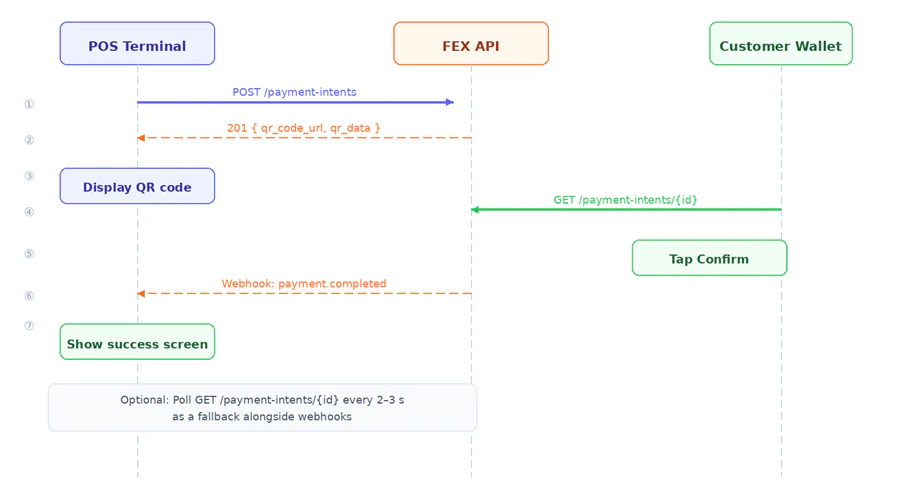
Step 1 — Create a Payment Intent
POST /merchant/api/v1/payment-intents
Headers:
| Field | Type | Required | Description |
|---|---|---|---|
amount | float | ✅ | Payment amount (must be positive) |
currency | string | — | ISO 4217 code. Default: USD |
description | string | — | Shown to customer in their wallet app |
expires_in | integer | — | Seconds until QR expires. Default: 1800 |
reference | string | — | Your internal order or invoice ID |
callback_url | string | — | URL to receive payment webhook events |
counter_id | string | — | Links intent to a specific POS terminal |
metadata | object | — | Arbitrary key-value pairs, echoed in webhooks |
201 Created:
Displaying the QR code: Useqr_code_urldirectly as an<img src="...">— it is a base64-encoded PNG. Alternatively, encodeqr_datausing your preferred QR library.
Step 2 — Poll for Status (Optional)
GET /merchant/api/v1/payment-intents/{id}
Poll every 2–3 seconds while the QR is displayed. Stop when status reaches a terminal state.
Response:
| Status | Meaning |
|---|---|
pending | Waiting for customer to scan and pay |
completed | Payment received |
cancelled | Cancelled by merchant |
expired | QR code lifetime elapsed |
refunded | Full refund issued |
Webhook vs polling: Webhooks are the primary notification mechanism. Polling is a recommended fallback, not a replacement.
