
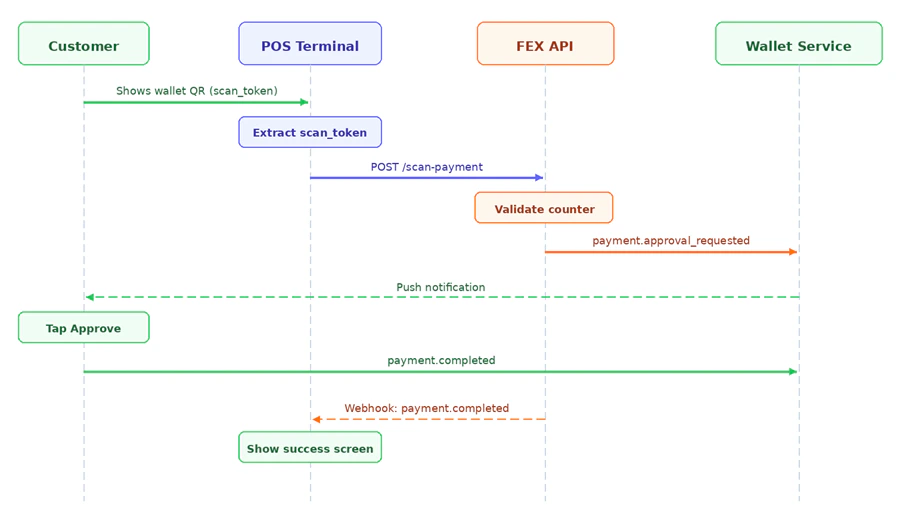
The POS terminal scans the customer’s QR code. The customer receives a push notification in their wallet app and taps to approve.
Image

Prerequisites — Register a Counter (POS Terminal)

Each physical terminal should be registered once. This enables per-terminal reporting and ties scan-payment transactions to a specific terminal. POST /merchant/api/v1/counters
{
  "name": "Till 1",
  "location": "Main entrance"
}
Response:
{
  "success": true,
  "counter": {
    "id": "ctr_xxxx",
    "merchant_id": "a1b2c3d4-...",
    "name": "Till 1",
    "location": "Main entrance",
    "status": "active",
    "webhook_secret": "whsec_xxxxxxxx"
  }
}
Save webhook_secret — you will use it to verify incoming webhooks for this terminal. Treat it like a password.

Initiate a Scan Payment

POST /merchant/api/v1/scan-payment
{
  "scan_token":    "{value decoded from customer's wallet QR}",
  "counter_id":   "ctr_xxxx",
  "amount":       49.50,
  "currency":     "USD",
  "description":  "Lunch combo",
  "expires_in":   120,
  "reference":    "ORDER-2087",
  "callback_url": "https://your-backend.example.com/webhooks/fex"
}
Request fields:
FieldTypeRequiredDescription
scan_tokenstringValue decoded from the customer’s wallet QR
counter_idstringID of the scanning terminal
amountfloatCharge amount
currencystringDefault: USD
expires_inintegerSeconds for customer to approve. Default: 300
descriptionstringShown to customer in push notification
referencestringYour internal order or invoice ID
callback_urlstringURL to receive the payment.completed webhook
Response 201 Created:
{
  "success": true,
  "payment_intent": {
    "id": "pi_yyyy",
    "status": "pending_approval",
    "amount": 49.50,
    "expires_at": "2025-01-01T12:37:00Z"
  }
}
The customer receives a push notification immediately. Their approval fires a payment.completed webhook to your callback_url.