> ## Documentation Index
> Fetch the complete documentation index at: https://developer.fexpayments.com/llms.txt
> Use this file to discover all available pages before exploring further.
# Standard QR Flow
> Merchant-initiated QR payment flow for POS terminals.
The POS terminal creates a payment intent, displays the resulting QR code, and waits for the customer to scan and confirm via their wallet app.
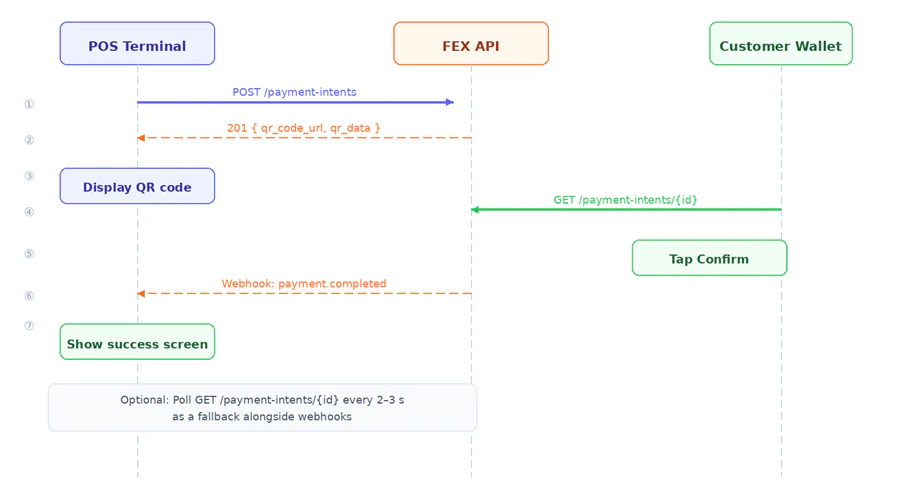 ### Step 1 — Create a Payment Intent
**`POST /merchant/api/v1/payment-intents`**
**Headers:**
```text theme={null}
Authorization: Bearer {access_token}
Content-Type: application/json
```
**Request body:**
```json theme={null}
{
"amount": 29.99,
"currency": "USD",
"description": "Coffee x2",
"expires_in": 300,
"reference": "ORDER-1042",
"callback_url": "https://your-backend.example.com/webhooks/fex",
"metadata": { "table": "5", "cashier": "Maria" }
}
```
**Request fields:**
| Field | Type | Required | Description |
| -------------- | ------- | :------: | --------------------------------------------- |
| `amount` | float | ✅ | Payment amount (must be positive) |
| `currency` | string | — | ISO 4217 code. Default: `USD` |
| `description` | string | — | Shown to customer in their wallet app |
| `expires_in` | integer | — | Seconds until QR expires. Default: `1800` |
| `reference` | string | — | Your internal order or invoice ID |
| `callback_url` | string | — | URL to receive payment webhook events |
| `counter_id` | string | — | Links intent to a specific POS terminal |
| `metadata` | object | — | Arbitrary key-value pairs, echoed in webhooks |
**Response `201 Created`:**
```json theme={null}
{
"success": true,
"payment_intent": {
"id": "pi_xxxx",
"merchant_id": "a1b2c3d4-...",
"merchant_name": "My Shop",
"amount": 29.99,
"currency": "USD",
"description": "Coffee x2",
"status": "pending",
"qr_code_url": "data:image/png;base64,...",
"qr_data": "fex://pay?intent=pi_xxxx&amount=29.99¤cy=USD&merchant=a1b2c3d4-...",
"expires_at": "2025-01-01T12:35:00Z",
"reference": "ORDER-1042",
"created_at": "2025-01-01T12:30:00Z"
}
}
```
> **Displaying the QR code:** Use `qr_code_url` directly as an `
### Step 1 — Create a Payment Intent
**`POST /merchant/api/v1/payment-intents`**
**Headers:**
```text theme={null}
Authorization: Bearer {access_token}
Content-Type: application/json
```
**Request body:**
```json theme={null}
{
"amount": 29.99,
"currency": "USD",
"description": "Coffee x2",
"expires_in": 300,
"reference": "ORDER-1042",
"callback_url": "https://your-backend.example.com/webhooks/fex",
"metadata": { "table": "5", "cashier": "Maria" }
}
```
**Request fields:**
| Field | Type | Required | Description |
| -------------- | ------- | :------: | --------------------------------------------- |
| `amount` | float | ✅ | Payment amount (must be positive) |
| `currency` | string | — | ISO 4217 code. Default: `USD` |
| `description` | string | — | Shown to customer in their wallet app |
| `expires_in` | integer | — | Seconds until QR expires. Default: `1800` |
| `reference` | string | — | Your internal order or invoice ID |
| `callback_url` | string | — | URL to receive payment webhook events |
| `counter_id` | string | — | Links intent to a specific POS terminal |
| `metadata` | object | — | Arbitrary key-value pairs, echoed in webhooks |
**Response `201 Created`:**
```json theme={null}
{
"success": true,
"payment_intent": {
"id": "pi_xxxx",
"merchant_id": "a1b2c3d4-...",
"merchant_name": "My Shop",
"amount": 29.99,
"currency": "USD",
"description": "Coffee x2",
"status": "pending",
"qr_code_url": "data:image/png;base64,...",
"qr_data": "fex://pay?intent=pi_xxxx&amount=29.99¤cy=USD&merchant=a1b2c3d4-...",
"expires_at": "2025-01-01T12:35:00Z",
"reference": "ORDER-1042",
"created_at": "2025-01-01T12:30:00Z"
}
}
```
> **Displaying the QR code:** Use `qr_code_url` directly as an ` ` — it is a base64-encoded PNG. Alternatively, encode `qr_data` using your preferred QR library.
***
### Step 2 — Poll for Status (Optional)
**`GET /merchant/api/v1/payment-intents/{id}`**
Poll every 2–3 seconds while the QR is displayed. Stop when `status` reaches a terminal state.
**Response:**
```json theme={null}
{
"success": true,
"payment_intent": {
"id": "pi_xxxx",
"status": "completed",
"completed_at": "2025-01-01T12:31:55Z"
}
}
```
**Payment intent statuses:**
| Status | Meaning |
| ----------- | ------------------------------------ |
| `pending` | Waiting for customer to scan and pay |
| `completed` | Payment received |
| `cancelled` | Cancelled by merchant |
| `expired` | QR code lifetime elapsed |
| `refunded` | Full refund issued |
> **Webhook vs polling:** Webhooks are the primary notification mechanism. Polling is a recommended fallback, not a replacement.
***
` — it is a base64-encoded PNG. Alternatively, encode `qr_data` using your preferred QR library.
***
### Step 2 — Poll for Status (Optional)
**`GET /merchant/api/v1/payment-intents/{id}`**
Poll every 2–3 seconds while the QR is displayed. Stop when `status` reaches a terminal state.
**Response:**
```json theme={null}
{
"success": true,
"payment_intent": {
"id": "pi_xxxx",
"status": "completed",
"completed_at": "2025-01-01T12:31:55Z"
}
}
```
**Payment intent statuses:**
| Status | Meaning |
| ----------- | ------------------------------------ |
| `pending` | Waiting for customer to scan and pay |
| `completed` | Payment received |
| `cancelled` | Cancelled by merchant |
| `expired` | QR code lifetime elapsed |
| `refunded` | Full refund issued |
> **Webhook vs polling:** Webhooks are the primary notification mechanism. Polling is a recommended fallback, not a replacement.
***